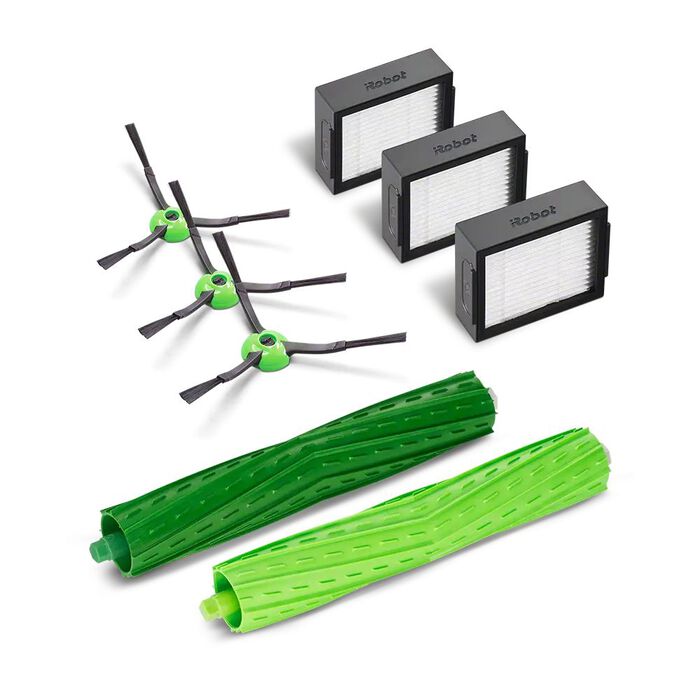
iRobot Roomba e, i and j Series Replenishment Kit (4639168)
Check the model under your robot before buying. This kit groups the filters, edge brushes and rollers for the e, i and j models iRobot lists.
Check current price
View on Amazon ↗
Match a robot vacuum’s model to the right filter, main roller and side brush. Learn when cleaning is enough, what to buy separately and how to test the fit.
Follow these steps at your own pace. Check product terms and prices directly with providers before purchasing.
A robot that leaves a line of dog hair down the hallway might need a new roller. It might also have hair wound under a removable end cap or a bin so full that fresh debris has nowhere to go. Ordering a large maintenance kit before looking underneath can leave you with several spare filters and exactly the same stripe on the floor.
Quick AnswerTake the model number from the robot itself, then look it up in the manufacturer’s parts catalog. Inspect the filter, main roller and side brush separately after carrying out the routine cleaning allowed by its manual. Match the worn item’s part number or explicit compatibility listing. Buy a kit when several included items fit your exact machine and will need replacement. Keep the dock model handy for dock parts such as bags, which are a separate purchase on many systems.
Take the robot off its dock, stop cleaning and follow the manual’s power-off instructions before handling moving parts. On a combination machine, remove a water tank or pad assembly first if its instructions require that before turning it over. Find the product label where the maker places it, commonly on the underside or behind a removable bin. You can also look in the app’s product information. Photograph the label so that the model and any suffix are legible. There is no need to post its serial number publicly.
Write down the robot model and the dock model on separate lines. A marketing name printed on a tall automatic-empty base may identify the bundle or the base, while the robot’s underside identifies the part that actually holds the roller. Families sold under similar names can use different filters or side-brush mountings. A mop-capable “Combo” machine may use a different part from a vacuum-only robot even though both boxes carry a related series name.
Identify the job. A robot parts guide helps restore the floor-cleaning machine you own. If the real problem is that an old robot cannot cross a doorway, fit under furniture or find its dock, a pack of brushes is unlikely to change that. Compare those design limits in the robot vacuum buying guide before spending money on an already unsuitable machine.
| What you see | First check with the robot stopped | When buying a part makes sense |
|---|---|---|
| Fluff left along the baseboard | Hair around the side-brush hub, missing or badly bent arms, or an obstruction under the brush | The compatible side brush is torn or no longer sweeps into the pickup path after permitted cleaning |
| A narrow stripe down the middle of a test area | Main roller surface and removable end caps, a full bin or blocked inlet | The roller has torn fins, missing bristles or damaged ends, and the matching replacement is listed |
| Dust escapes or the robot reports a filter issue | Filter seating, bin latch, visible frame/seal damage and the model’s cleaning directions | The media or frame is damaged, missing, or due for replacement under the manufacturer’s instructions |
| Robot works but the dock does not empty it | Dock bag, dock airway and how the bin meets the base | The dock maker lists a full or unsuitable bag as the issue, separately from the robot filter |
Make one baseline observation under ordinary conditions. For example, the robot picks up familiar crumbs from the center of the kitchen but leaves pet hair around chair legs. That points you toward the side brush, obstacles or route before a filter purchase. If it leaves a similar line through the center of every pass, turn your attention to the main cleaning head and inlet. Do not scatter flour, liquids or pet waste to create a test. Use a small familiar stretch of floor and its normal dry debris.
If pickup declines mainly on an upholstered sofa, a floor robot cannot reach the surface. A cordless vacuum with an appropriate upholstery attachment addresses a different job. A packet labeled for pet hair will not turn a floor robot into an above-floor cleaner.
The main brush or rollers. Some machines use a bristle roller, others use one or two rubber rollers. Where there is a pair, the ends may have different shapes, colors or drive fittings. Look at the length, the molded end and the direction of any markings. Hair around a removable cap can bind a good roller. A torn rubber fin, cracked end or bald section of bristles is different from a surface that simply needs its permitted cleaning. Use the manual’s diagram before removing any cap. Some caps are not intended for removal.
The side or corner brush. This part sweeps debris inward along the wall. Look at the hub and how it mounts, including whether the screw is included or retained in the old brush. An almost-matching hub can appear seated until the robot starts turning. Compare the number and arrangement of arms to the manufacturer’s diagram as a cross-check, then verify the actual part number. Repeatedly finding cords wound around a new brush is also a room-layout issue. Organizing loose cables under a desk keeps them away from the route.
The filter. Look for the complete filter assembly: its frame, pull tab, any perimeter gasket and orientation. Dimensions alone rarely show whether a frame seals against the bin properly. A pleated filter that looks a little narrower or has a differently placed lip warrants another compatibility check. If the manual says the filter is dry-clean only, do not wash it even when the empty plastic bin is washable. Other models use washable elements and give explicit drying directions. Follow the directions for the exact filter you will reinstall. Never test normal cleaning with a required filter left out.
Open the official parts catalog for the region where the robot was sold. Search for the robot model and note the replacement part or kit number. Next read the full list of supported machines and any exclusions. Keep a screenshot or bookmark showing the match. At a retailer, compare the same part number, contents and model list. “Fits most popular robot vacuums” gives you no way to resolve a disagreement between a photo and the part in the packet.
Three genuine iRobot listings illustrate the point. Kit 4636432 names Roomba 600-series robots and lists the parts used by that family. Kit 4757964 names the Roomba e, i and j series and specific Combo i5 and j5 robots. Kit 4646124 is listed for the Roomba s series only. The presence of rubber rollers and filters in more than one box does not make the kits interchangeable. These are examples of looking up the family, not a general fit claim for newer robots carrying the Roomba name. 600-series kit, e/i/j and specified Combo kit and s-series kit.
If a listing groups many robot generations together, look for a documented cross-reference from the part maker. Ask for the exact model number in writing when a retailer’s photo and list disagree. Check the return conditions before opening a package or fitting a consumable. Saving the old part until the replacement completes its first run makes it easier to show which clip, end cap or sealing lip differs.
Lay out a simple list: what needs replacement now, what is likely to be needed during the next few maintenance cycles and what is still in the cupboard. A shedding dog and a flat of mostly hard floors may demand frequent filter checks and regular cleaning around roller ends. That does not mean the dog wears out one complete roller for each filter. Find the care schedule in the manual or the app’s maintenance section and adjust inspections to what you actually find.
For an i-series example, iRobot advises more frequent filter attention in a home with pets than in a home without them. Its schedule distinguishes cleaning a component from replacing it. Record a quick inspection when you empty the bin and buy the component your robot needs, using that specific schedule for longer-term planning. A schedule for another robot is a poor basis for ordering a year’s worth of parts. iRobot’s i-series care schedule.
Suppose you have two clean spare filters but one cracked side brush. A single confirmed side brush solves the immediate issue with little waste. A second household has a damaged roller pair, a filter with a cracked frame and no spare side brush. A compatible replenishment kit is a reasonable item to compare there. For each box, count only the pieces you will actually use and divide the current total cost by those useful pieces if you want a rough comparison. A spare bag for a different dock adds no value, however large the item count printed on the front.
Use the robot’s maintenance instructions with the machine stopped. Compare the replacement with the removed component side by side. Seat the roller ends in the marked positions, engage the guard until it latches, and fit the filter in the orientation specified for the bin. If a retaining screw needs force before the hub is flush, stop and recheck the part and orientation. Avoid trimming tabs, bending the filter frame or operating with a loose guard to make an apparent match work.
Return the machine to the same test area. Observe one supervised pass. Listen for a new clicking noise, see whether the side brush rotates as intended, and check the floor and bin when the run finishes. If the previous stripe disappears without a new noise or error, record the date and part number. Reset an app’s wear reminder only if its instructions call for that after replacing the corresponding item. Resetting a timer changes the record, not the physical condition of a roller.
That phrase describes a claimed filtration characteristic. You still need a physically compatible frame, proper sealing and an explicit model match. Do not infer a particular filtration test, room-air cleaning capability or health outcome from the product name.
First confirm the guard is latched and both ends are correctly seated. Check the inlet and bin with the robot stopped. If a correctly fitted compatible roller still fails to drive or the robot repeats an error, consult the model-specific support instructions. A cleaning-head assembly or drive fault is a different purchase from a wear kit.
The right refill order starts with the part that failed, not the size of the kit. Match the robot model, confirm how each component seats and buy for the wear you can actually see. That usually solves a pickup problem faster than changing everything underneath at once.
As an Amazon Associate, TeachMeHow earns from qualifying purchases.
Check the model under your robot before buying. This kit groups the filters, edge brushes and rollers for the e, i and j models iRobot lists.
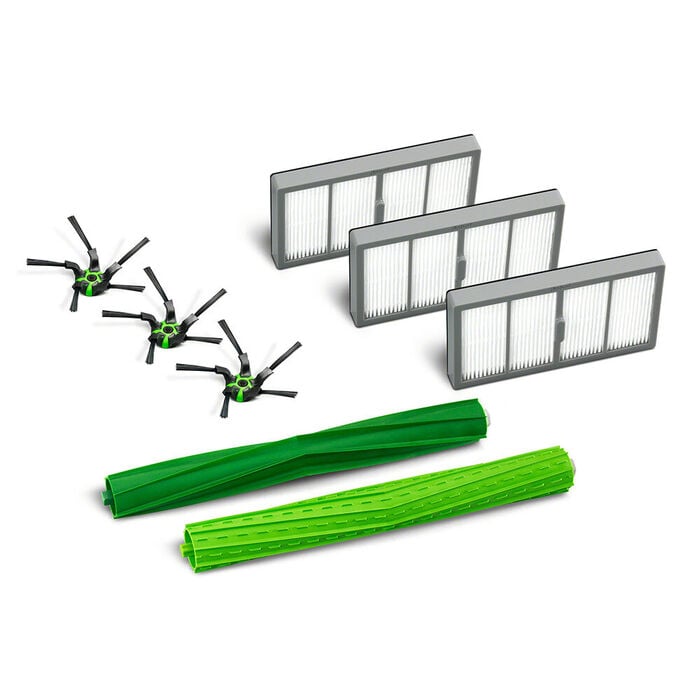
For an s Series machine whose manual lists 4646124. The kit contains the matching filters, corner brushes and rubber brushes.
Prices may change. Check the retailer for the current price and availability. We may earn a commission from qualifying purchases at no additional cost to you. Learn more.
Comments
Read or join the discussion.